v2.8 Self-hosted CMMS for WordPress · Android & iOS REST API · One-time license View plans →
WordPress-native CMMS

Maintenance control that lives where your company already works

JULIO CMMS WP is a complete Computerized Maintenance Management System built as a WordPress plugin. Run work orders, assets, preventive maintenance, meters, inventory, and mobile workflows on the same platform that already powers your intranet, intranet portal, or public site — with roles, users, and content you already trust. Own it for life!

Full CRUD modules REST + JWT for mobile 50+ languages IoT & PdM ready
1 stackWordPress + CMMS together
7+Core maintenance modules
REST APIAndroid & iOS ready with JWT
Self-hostedYour data, your servers
50+ languages in the product
English EN
Chinese ZH
Spanish ES
Japanese JA
German DE
French FR
Arabic AR
Italian IT
Portuguese PT
Korean KO
Russian RU
Hindi HI
Dutch NL
Turkish TR
Indonesian ID
Bengali BN
Polish PL
Swedish SV
Thai TH
Persian FA
Vietnamese VI
Norwegian NO
Punjabi PA
Danish DA
Hebrew HE
Javanese JV
Greek EL
Tagalog TL
Romanian RO
Finnish FI
Czech CS
Serbian SR
Urdu UR
Tamil TA
Telugu TE
Marathi MR
Hungarian HU
Zhuang ZA
Gujarati GU
Kurdish KU
Ukrainian UK
Slovak SK
Bulgarian BG
Catalan CA
Uzbek UZ
Kazakh KK
Amharic AM
Azerbaijani AZ
Kannada KN
Burmese MY
WordPress plugin Installs like any other plugin — no separate SaaS tenancy.
Full CMMS modules Work orders, assets, PM, parts, meters, reports, portal.
Android & iOS API JWT auth, refresh tokens, FCM — one REST contract.
Own it for life One-time site packs. No per-seat monthly tax.

Benefits of a CMMS

A Computerized Maintenance Management System turns reactive firefighting into planned, measurable operations. Whether you run a plant, fleet, facility, or multi-site utility, these are the outcomes organizations buy a CMMS to achieve.

1

Less unplanned downtime

Schedule preventive work, capture meter-based triggers, and clear backlog before failures stop production.

2

One source of truth

Assets, locations, work history, parts, and labor live in structured records — not spreadsheets and group chats.

3

Accountable execution

Assign technicians, track status from request to completion, and prove who did what, when, and on which asset.

4

Smarter spare parts

Link parts to work, watch minimum stock, and reduce “parts not available” surprises on critical jobs.

5

Compliance & audit readiness

Retain completion notes, dates, PM history, and inspection trails when insurers, clients, or regulators ask.

6

Decisions from data

Use backlog, cost, PM compliance, MTBF/MTTR-style views, and meter trends instead of gut feel alone.

What “good” looks like after CMMS adoption

  • Work requests convert to work orders in a controlled workflow — not lost emails.
  • PM due dates are visible; overdue work is impossible to ignore.
  • Technicians know today’s “My Tasks” without chasing supervisors.
  • Asset hierarchy and location trees reflect how the site is actually laid out.
  • Leadership sees workload, busy technicians, and backlog in one dashboard.

Benefits of integrating CMMS into a Content Management System

Most CMMS products are separate SaaS islands. JULIO CMMS WP runs inside WordPress — the CMS your team may already use for the company site, intranet, SOPs, and news. That is a strategic advantage, not a compromise.

Traditional standalone CMMS

  • Another vendor login and password policy
  • Separate user directory to provision and offboard
  • Documents and SOPs stored somewhere else
  • Public or intranet content disconnected from work
  • Recurring per-seat cloud fees with limited data control

CMMS inside WordPress (JULIO CMMS WP)

  • Reuse WordPress users, roles, and SSO plugins you already run
  • One security perimeter: hosting, backups, SSL, WAF
  • Link help manuals and procedures as URLs on work orders
  • Frontend portal tabs for staff without teaching a second UI paradigm
  • Self-hosted option: data residency and cost predictability

Unified access control

Map who sees Work Orders, Parts Requests, or Reports using WordPress capabilities and custom roles — including frontend tab visibility.

Content + maintenance together

Publish training posts, safety bulletins, and site news next to the same login that opens “My Tasks” and work order detail views.

Lower total cost of ownership

No mandatory multi-product stack. License the plugin, use your existing hosting, and scale sites with transparent pack pricing.

Familiar administration

Updates, permissions, and media uploads follow WordPress patterns your IT or agency partner already understands.

API without leaving the platform

REST endpoints under /wp-json/jcmms/v1/ with JWT support power mobile apps while remaining part of the same site.

Brandable staff experience

Pair with control-panel-style themes so the maintenance portal feels like your company product — not a generic third-party skin.

A formidable CMMS feature set — not a toy plugin

JULIO CMMS WP is built for real maintenance teams: hierarchical assets and locations, PM generation, meter triggers, inventory movements, parts requests, reports, and a mobile-oriented API.

From reactive tickets to condition-aware maintenance

Combine classic work-order discipline with meters, IoT ingest, and predictive views — without standing up a separate industrial software stack.

Work Orders

Types (CM, PM, inspection, PdM, safety, projects), assignment, due dates, status, labor, parts used, help links, media.

Assets & Locations

Hierarchy navigation, types from settings, custody/movements, geo coordinates, online status, rich filters.

Preventive Maintenance

Schedules, next due, active flags, generate work orders in one click, cron-oriented generation support.

Work Requests

Intake from staff, convert to work order in one click, priorities and status tracking.

Parts & Inventory

Stock levels, min quantity filters, barcodes, stock movements, parts requests with supply workflow.

Meters & Triggers

Readings, comparisons (eq / gt / lt / range), automatic work order or PM-driven responses.

My Tasks & Portal

Frontend tabs, role-gated modules, technician-focused lists of incomplete assigned work.

Reports

PM compliance, downtime & reliability (MTBF/MTTR), maintenance cost, backlog, spare usage.

IoT & PdM

Device ingest, predictive analysis endpoints, vibration/neural exploration modules for advanced sites.

REST + Mobile

JWT auth, token refresh, CRUD resources — built for Android and iOS clients with an offline-oriented architecture.

Global i18n

Extensive language coverage with JSON maps, core packs in the plugin, optional extra language packs.

Admin & Settings

Email settings, custom roles, asset types, language pack management, busy-technician visibility.

Work OrdersAssetsLocationsPartsPMsWork RequestsMetersPart RequestsReportsIoTPdMJWT API

Screenshots gallery

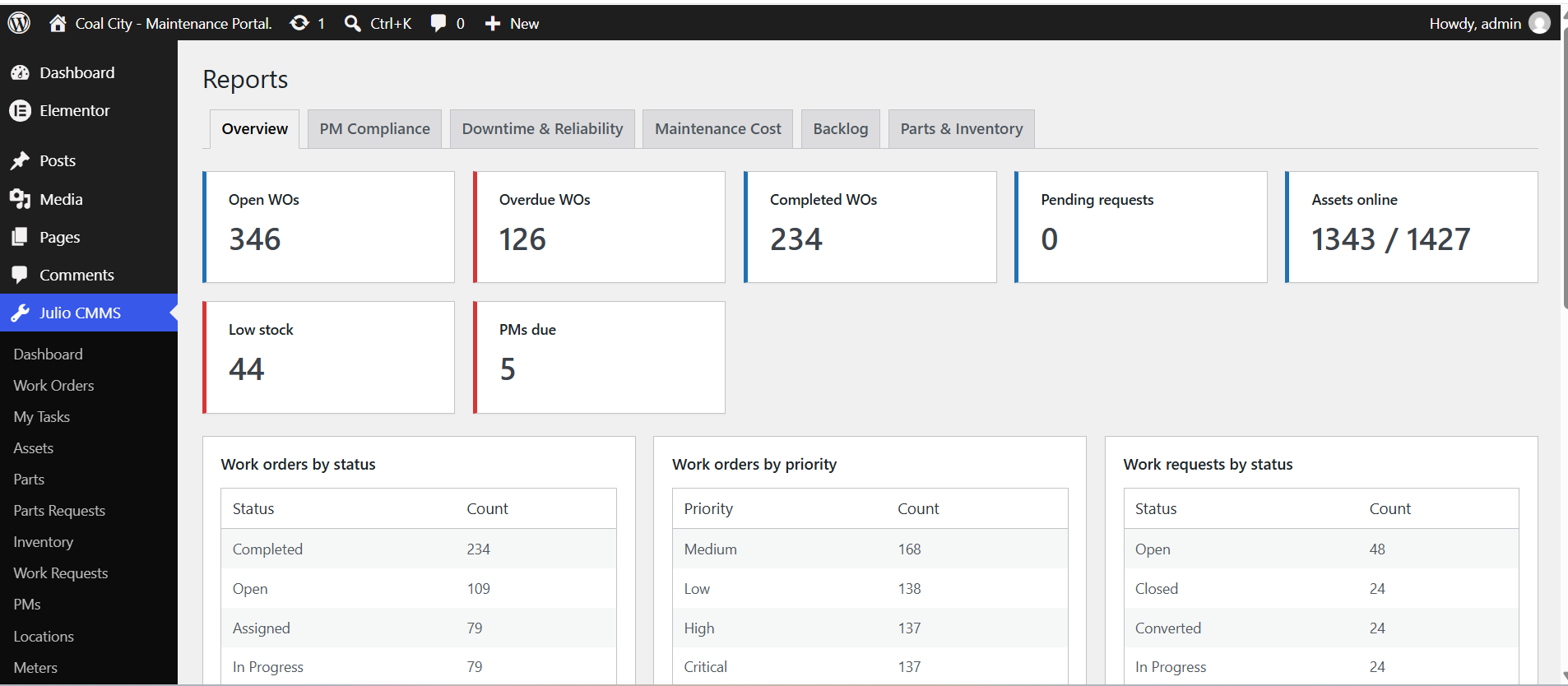
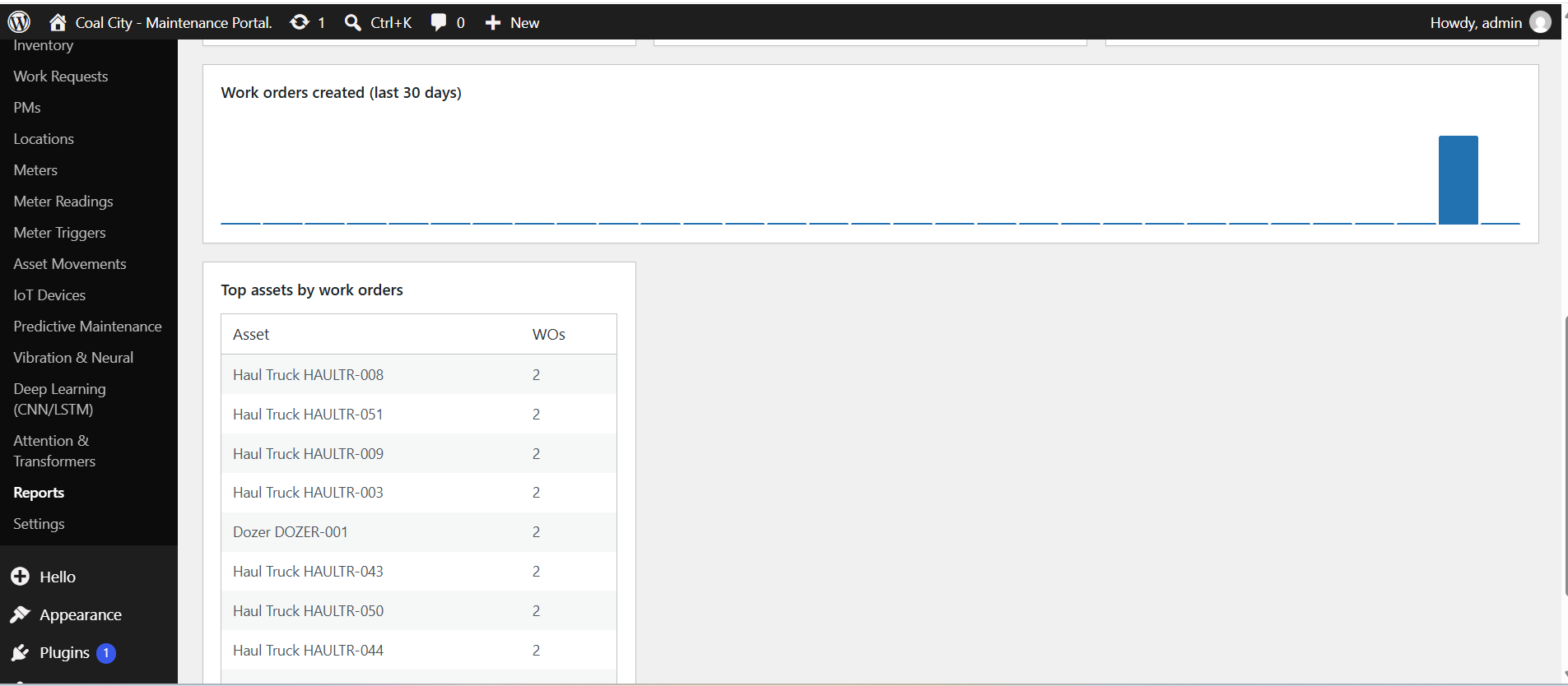
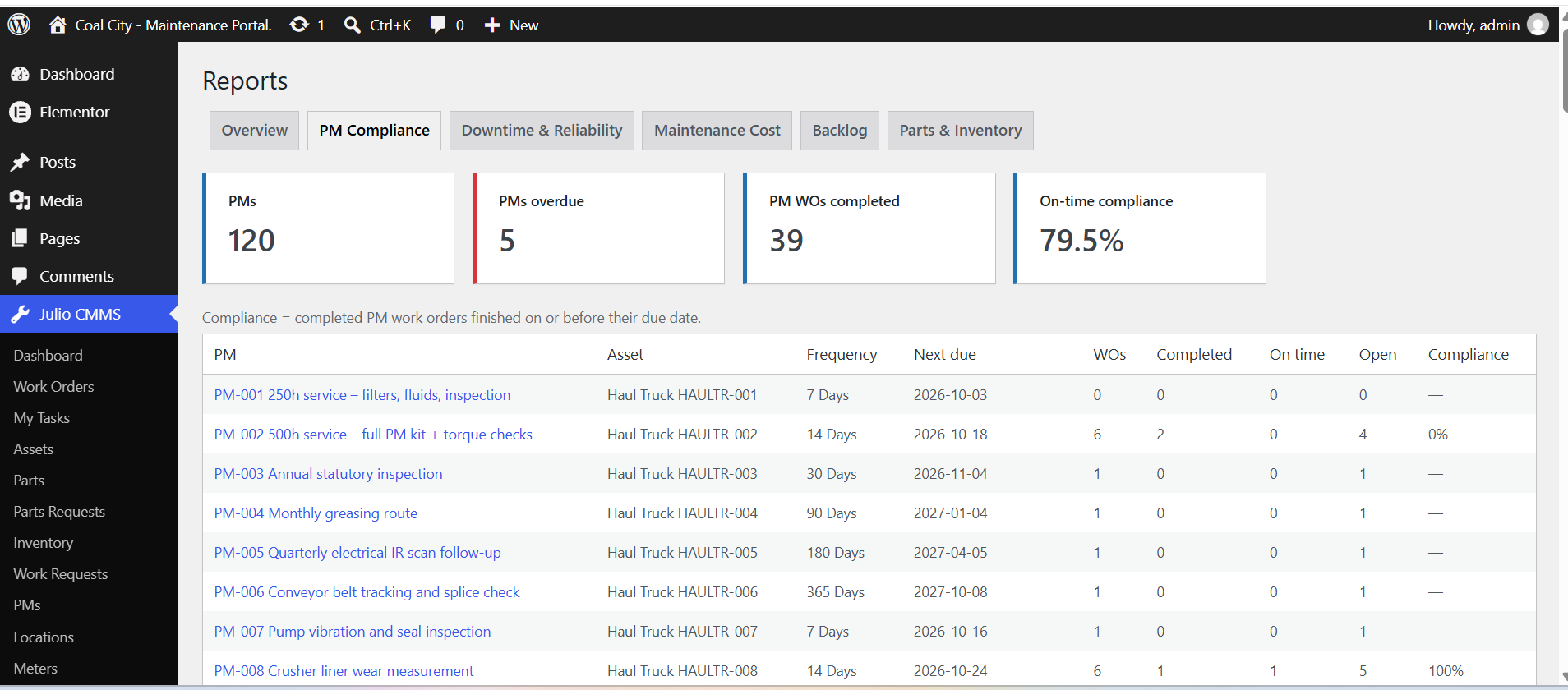
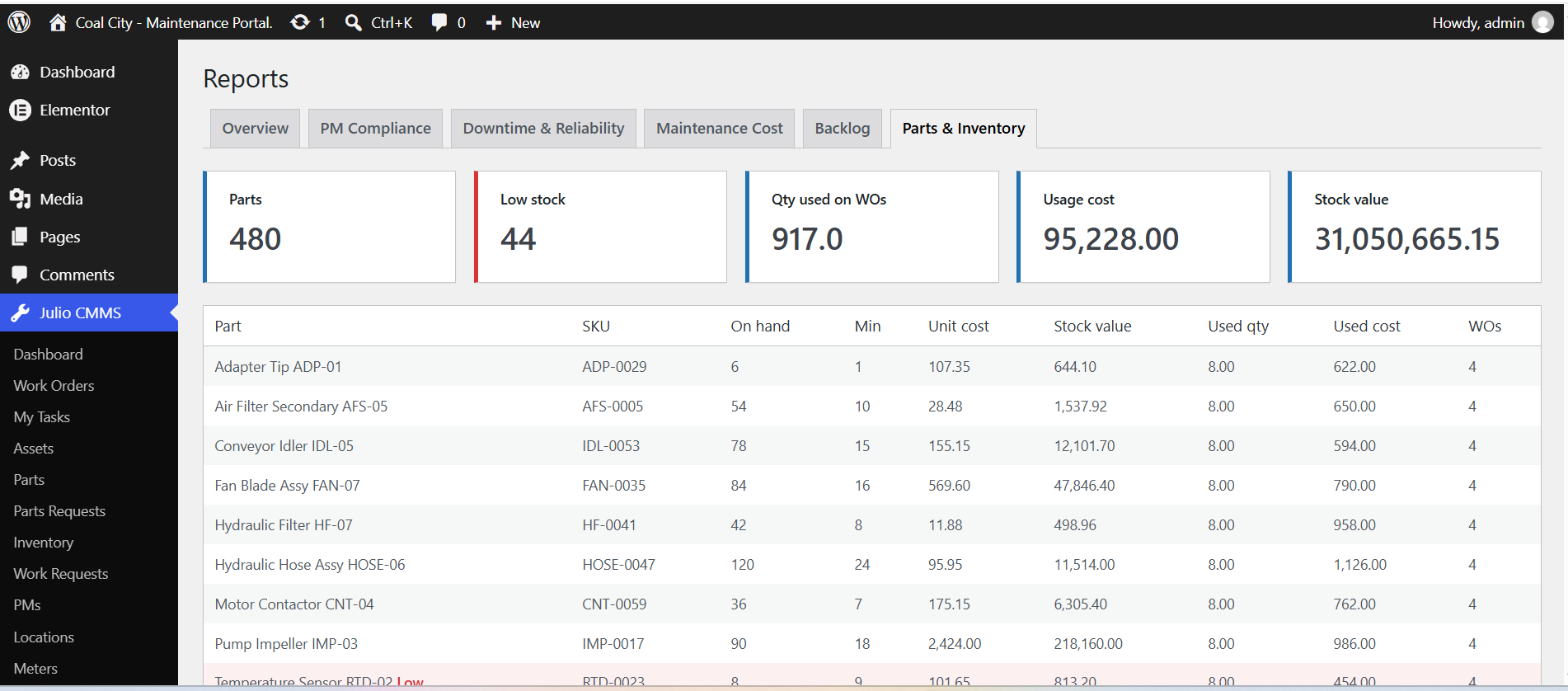
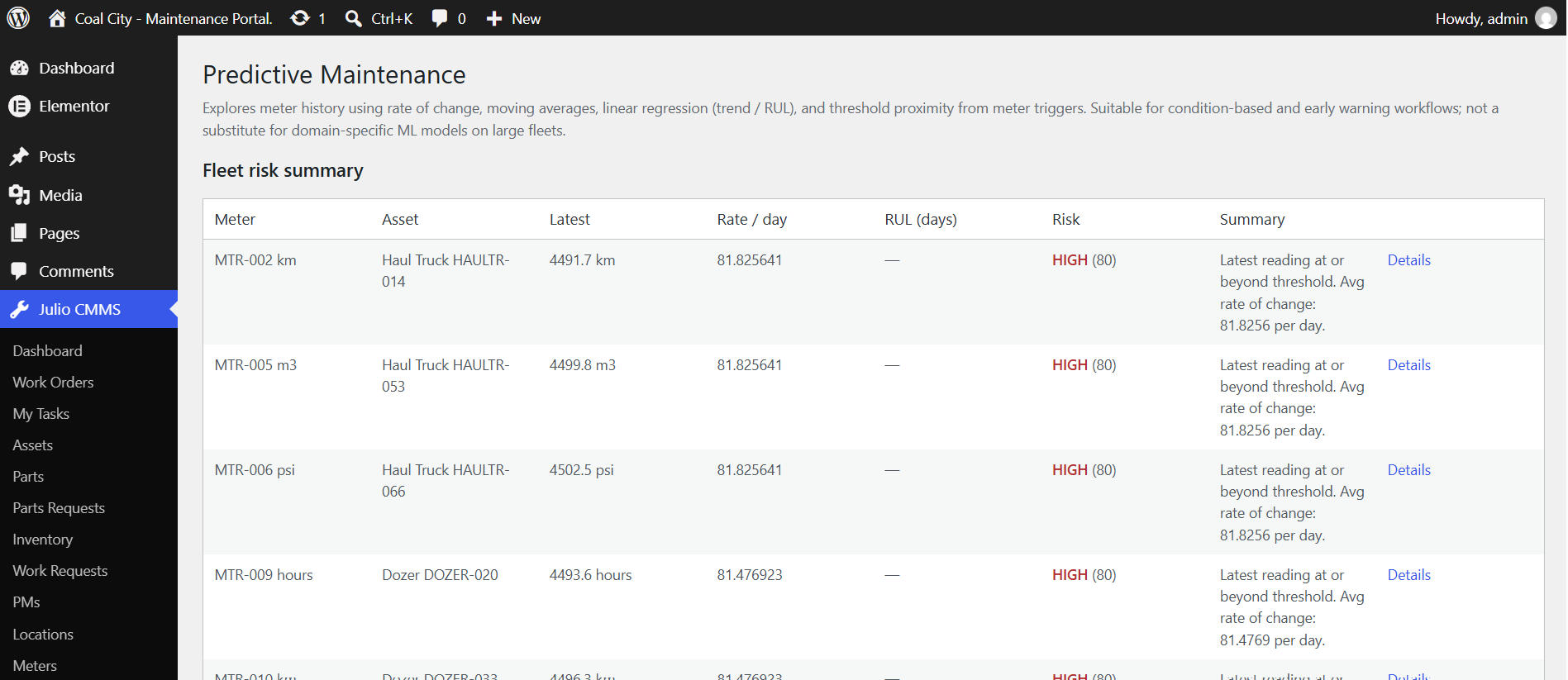
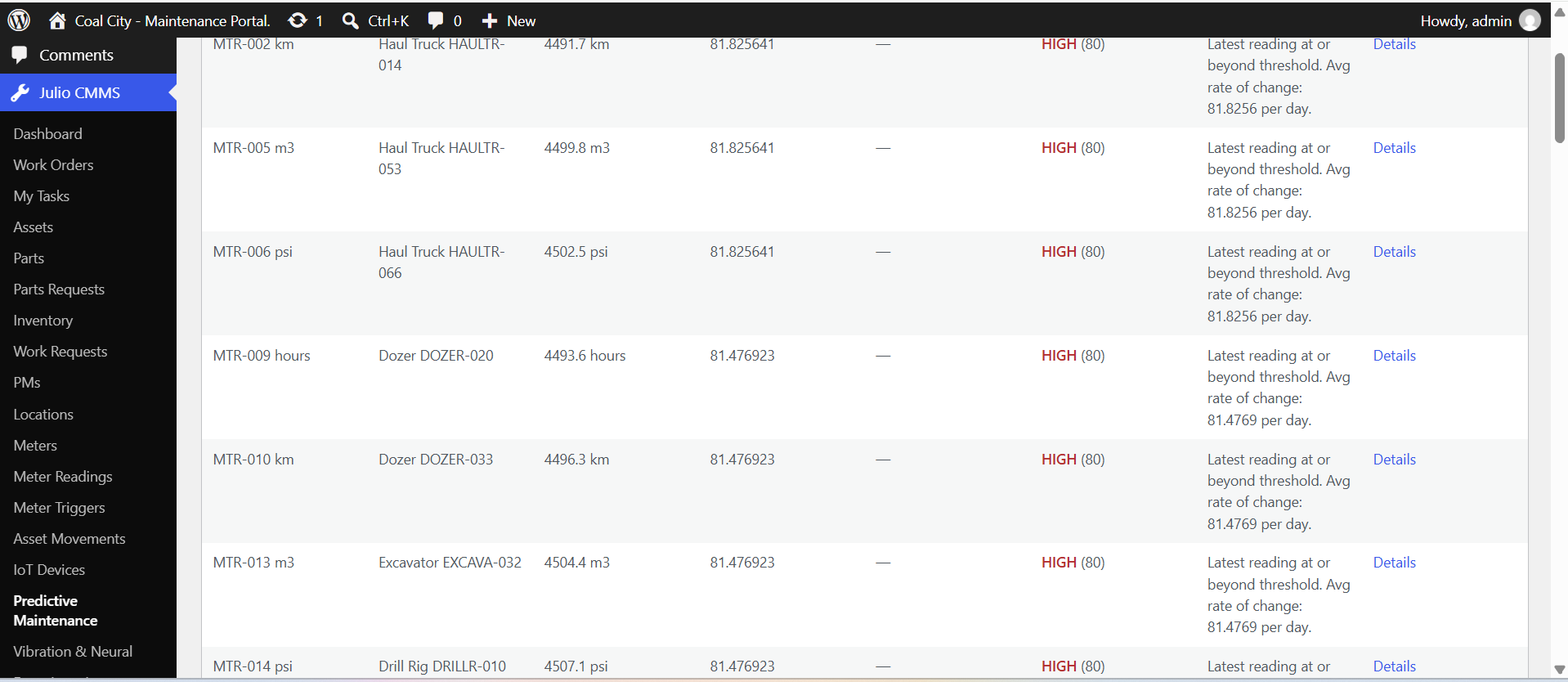
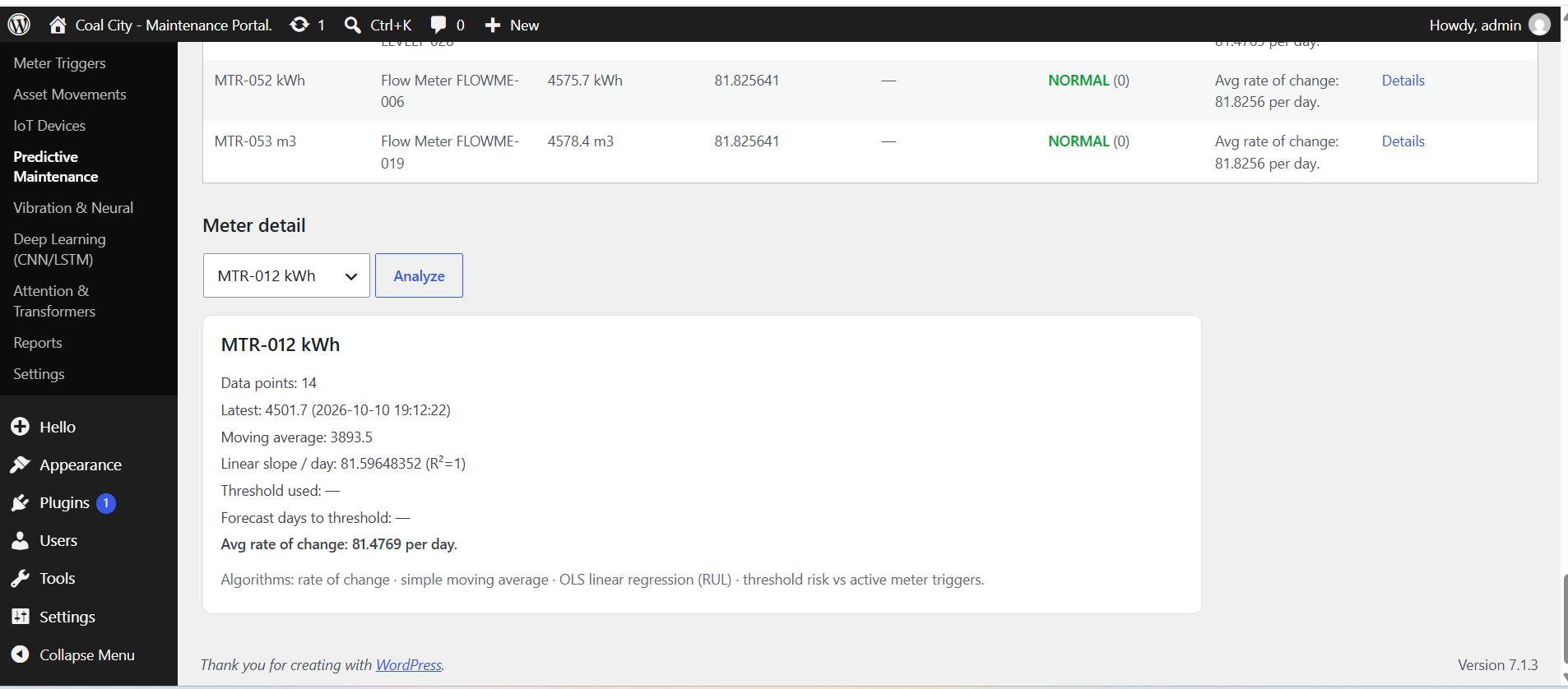
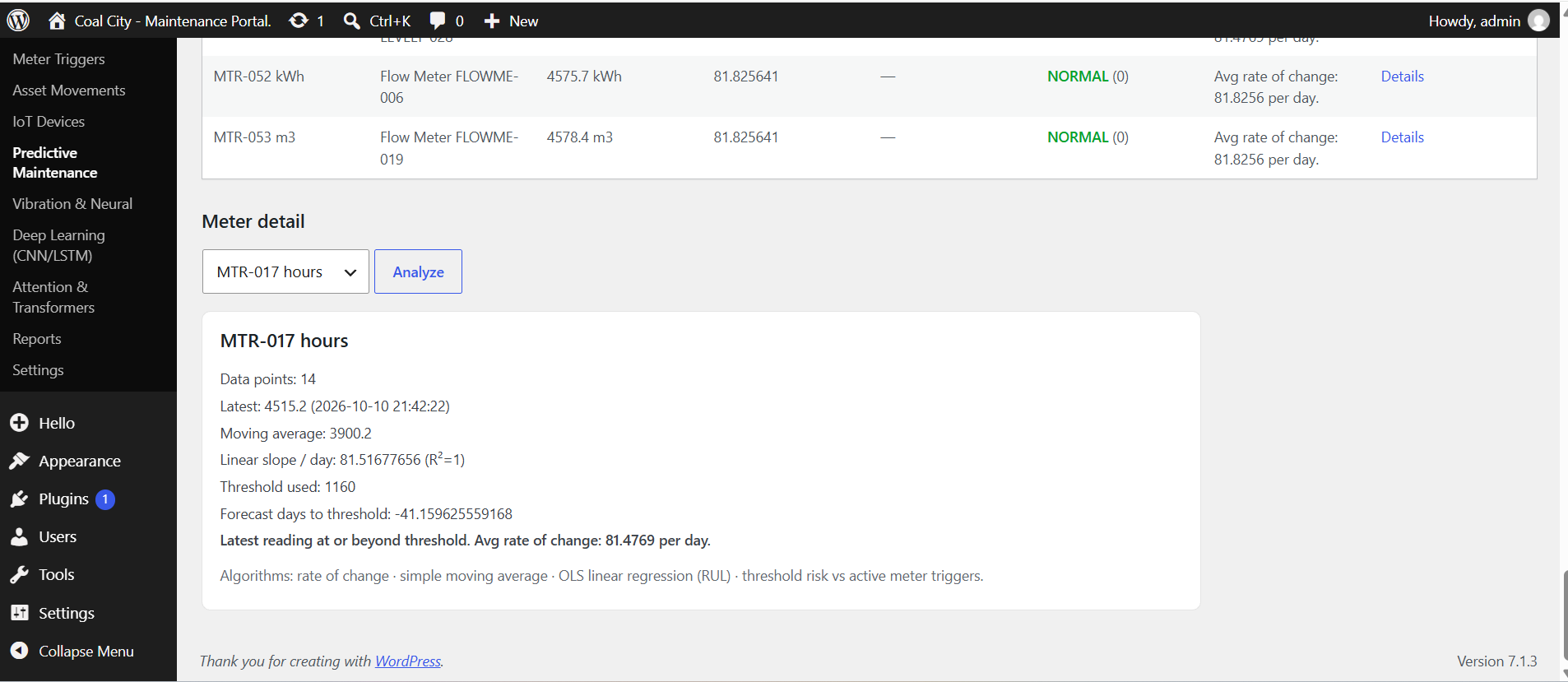
Real admin screens from a live coal-mine maintenance portal — dashboard, assets, reports, predictive analytics, vibration, deep learning, and transformers.

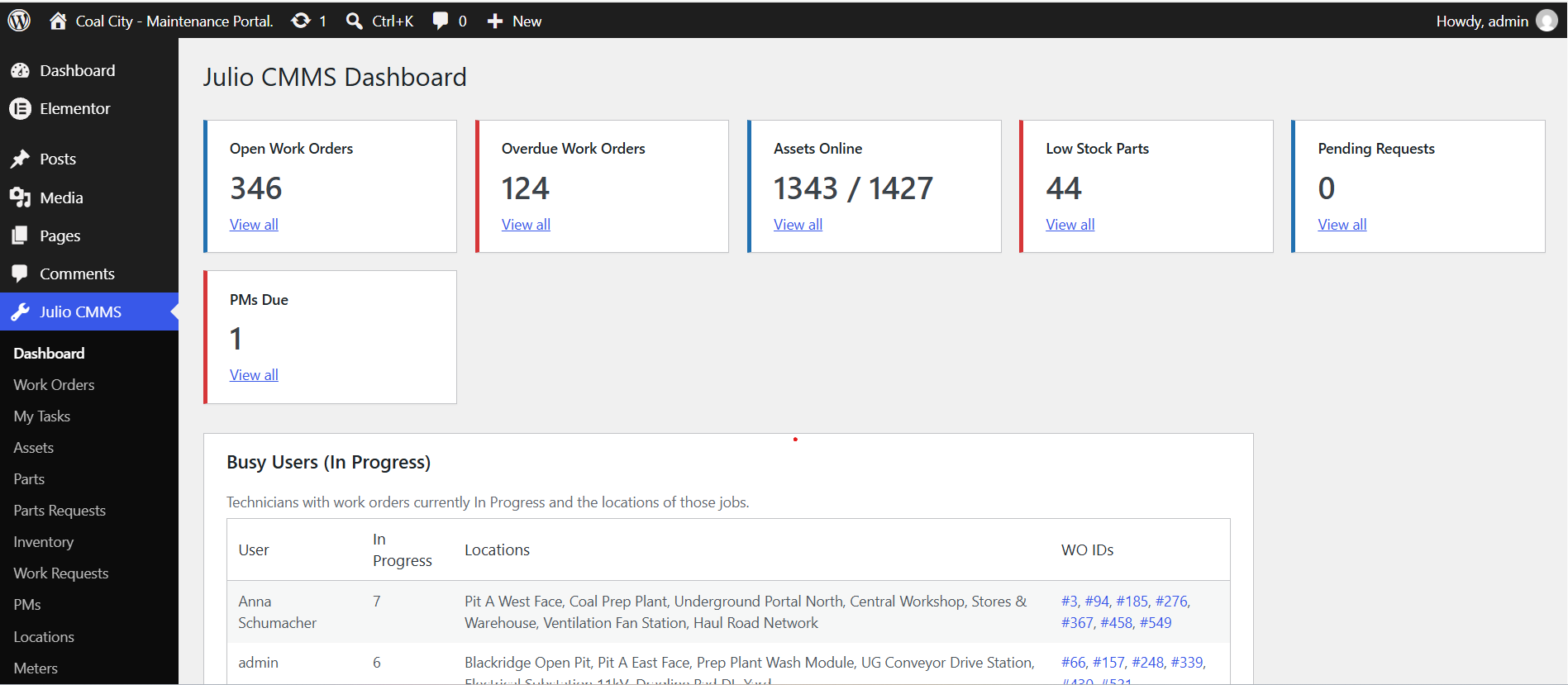
Dashboard overview — open WOs, overdue, assets online, stock signals
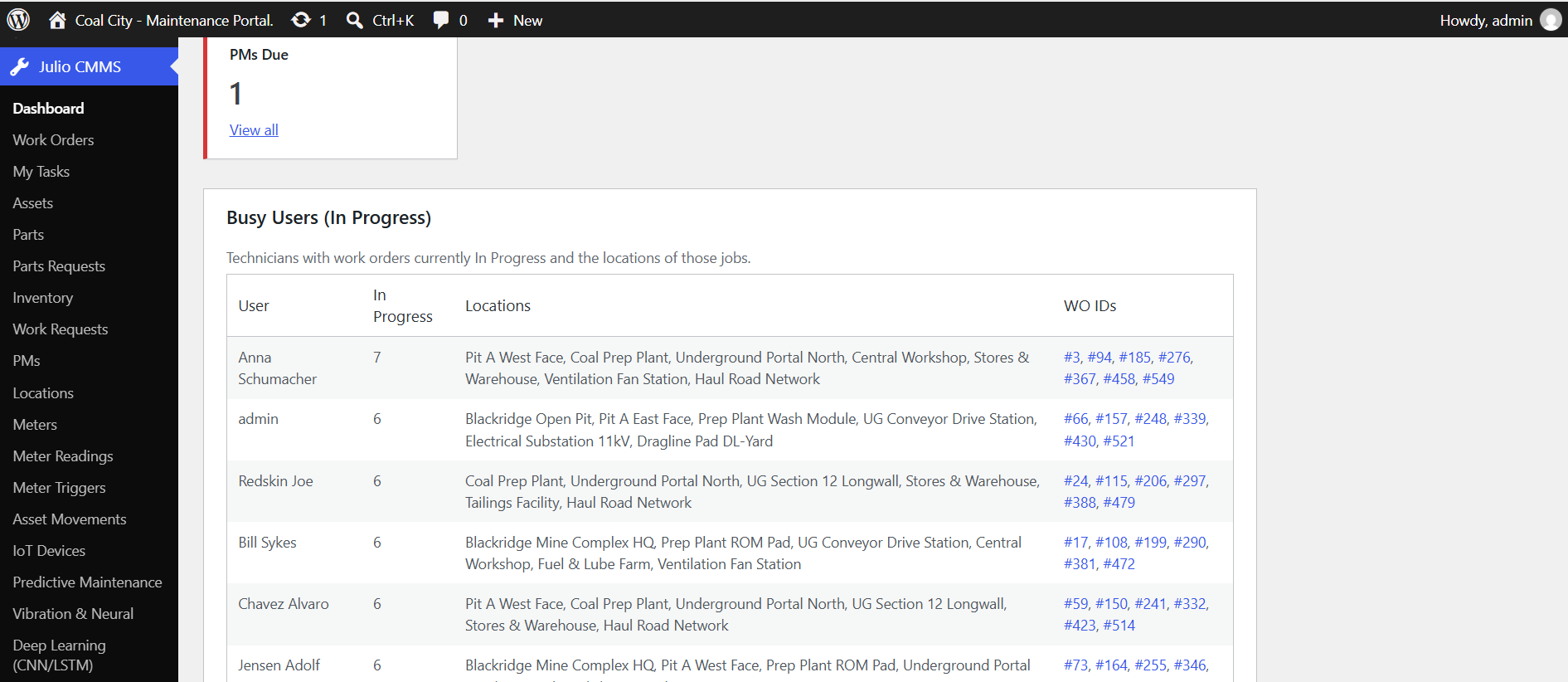
Busy users table — technicians In Progress and job locations
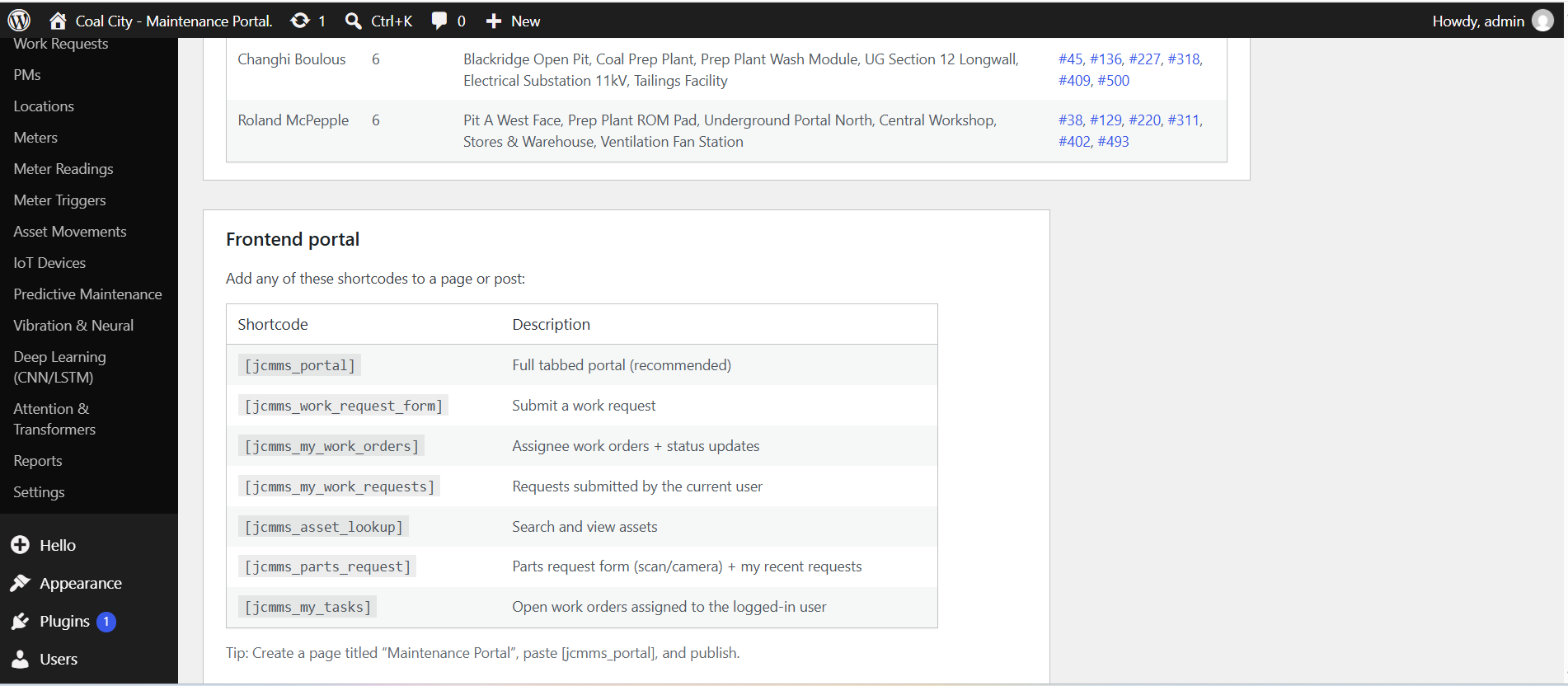
Frontend portal shortcodes for technician-facing pages
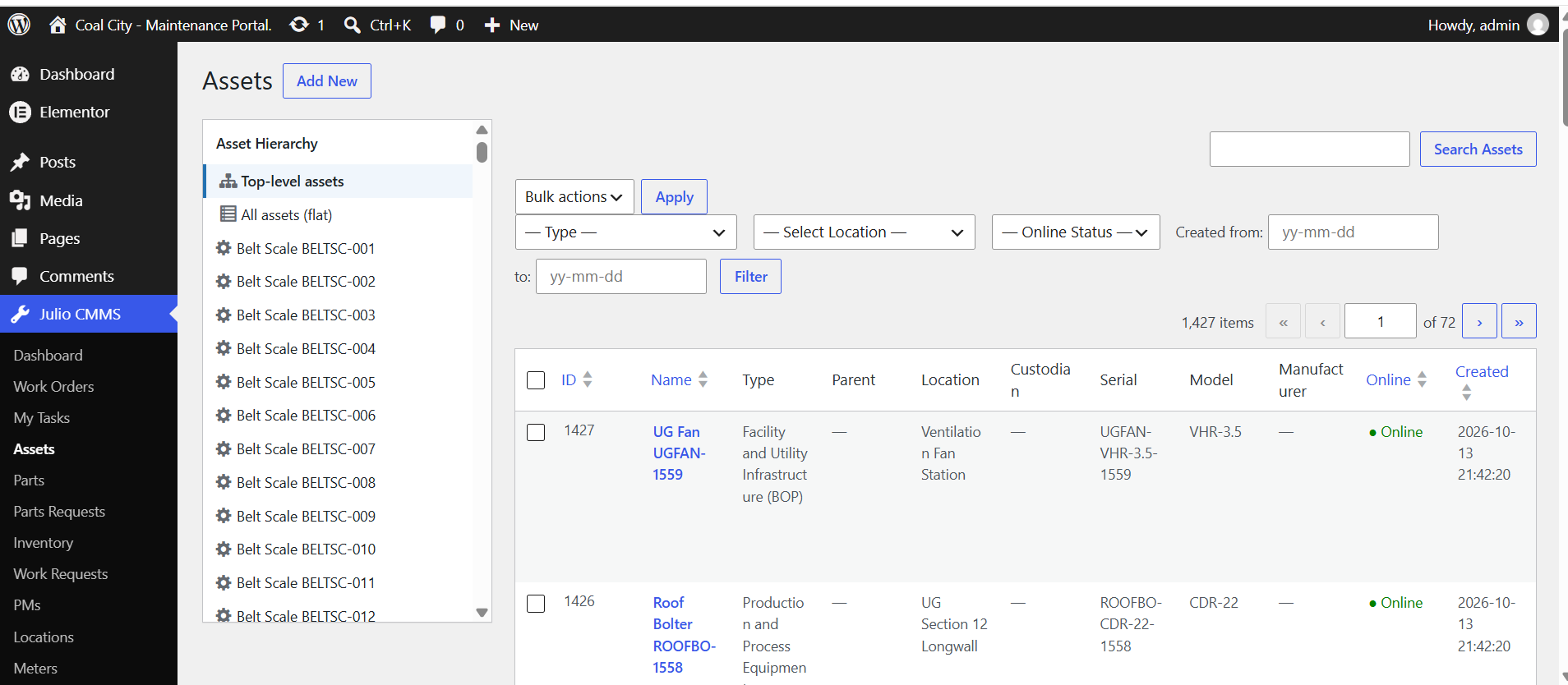
Assets list with hierarchy navigation and rich filters
Reports overview — status, priority, and request breakdowns
Work-order creation trend and top assets by volume
PM compliance — frequency, due dates, on-time rates
Parts & inventory usage, stock value, and cost tracking
Predictive maintenance — fleet risk summary from meter trends
PdM risk table with rate-of-change and threshold proximity
Meter detail analysis — moving average and linear slope
Threshold forecasting and RUL-oriented meter analytics
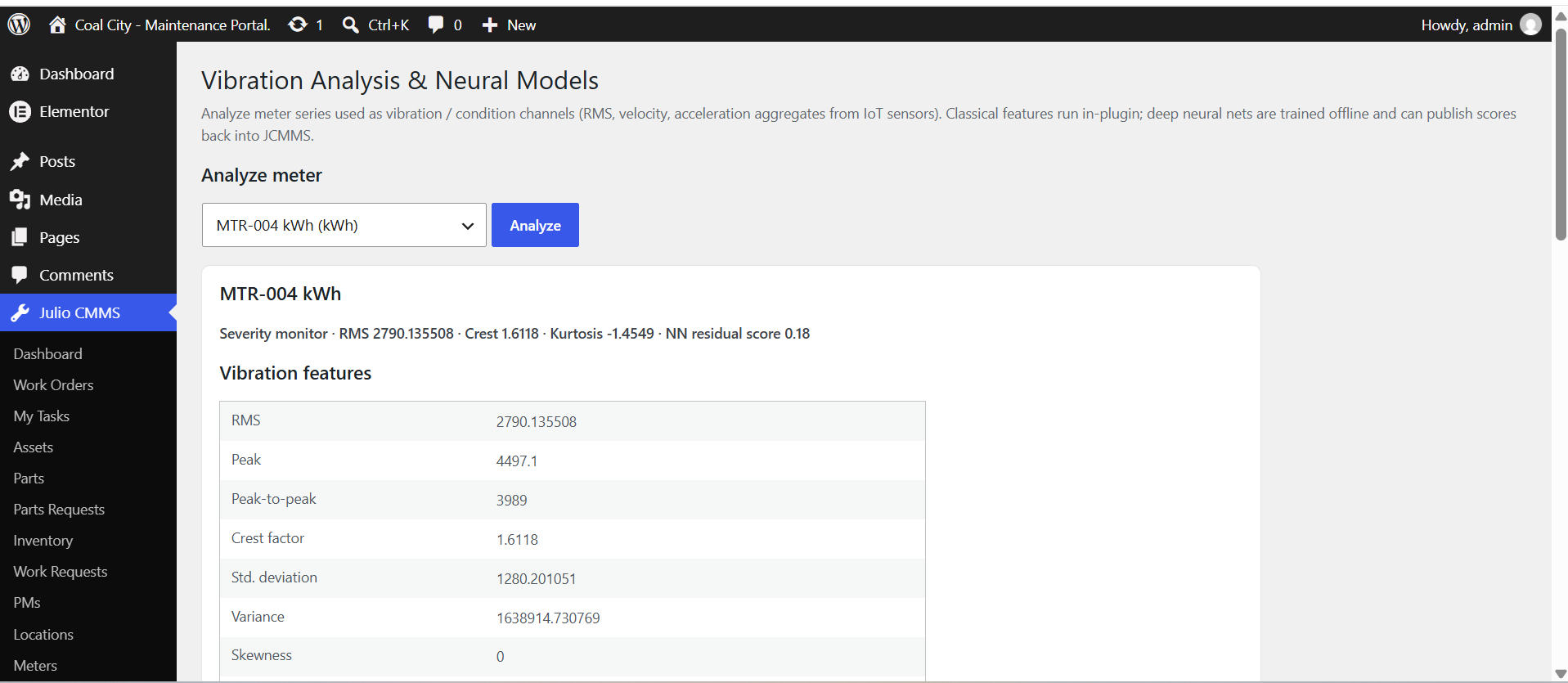
Vibration analysis — RMS, crest, kurtosis feature extraction
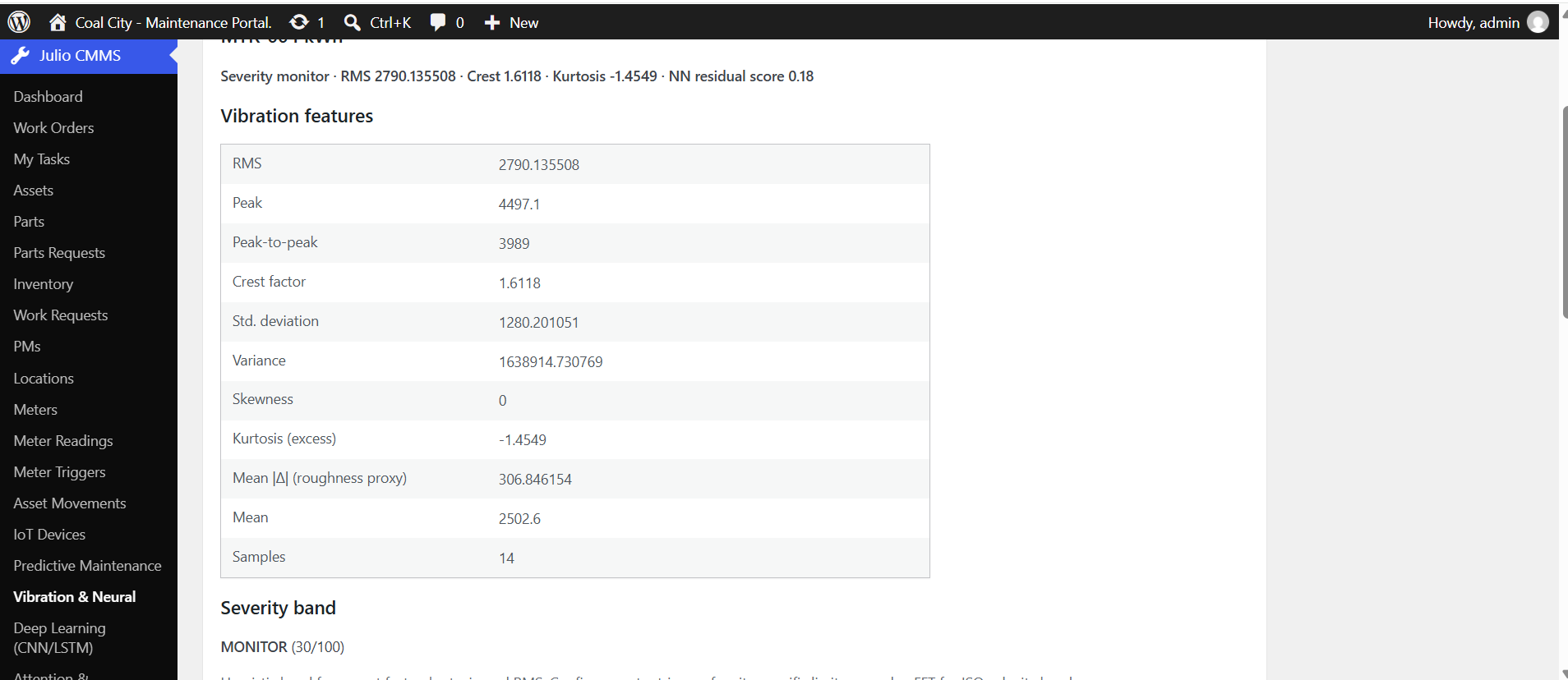
Vibration feature table and severity band scoring
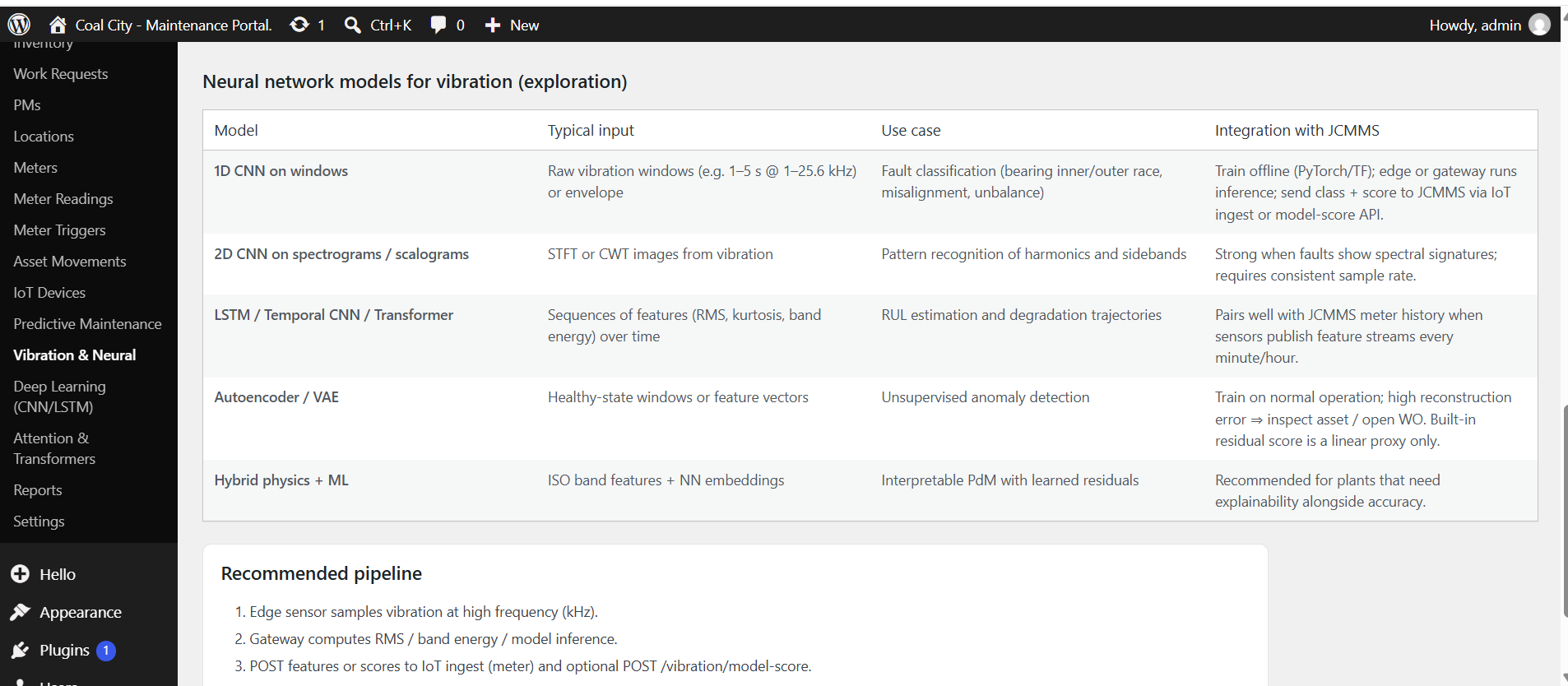
Neural network models for vibration exploration
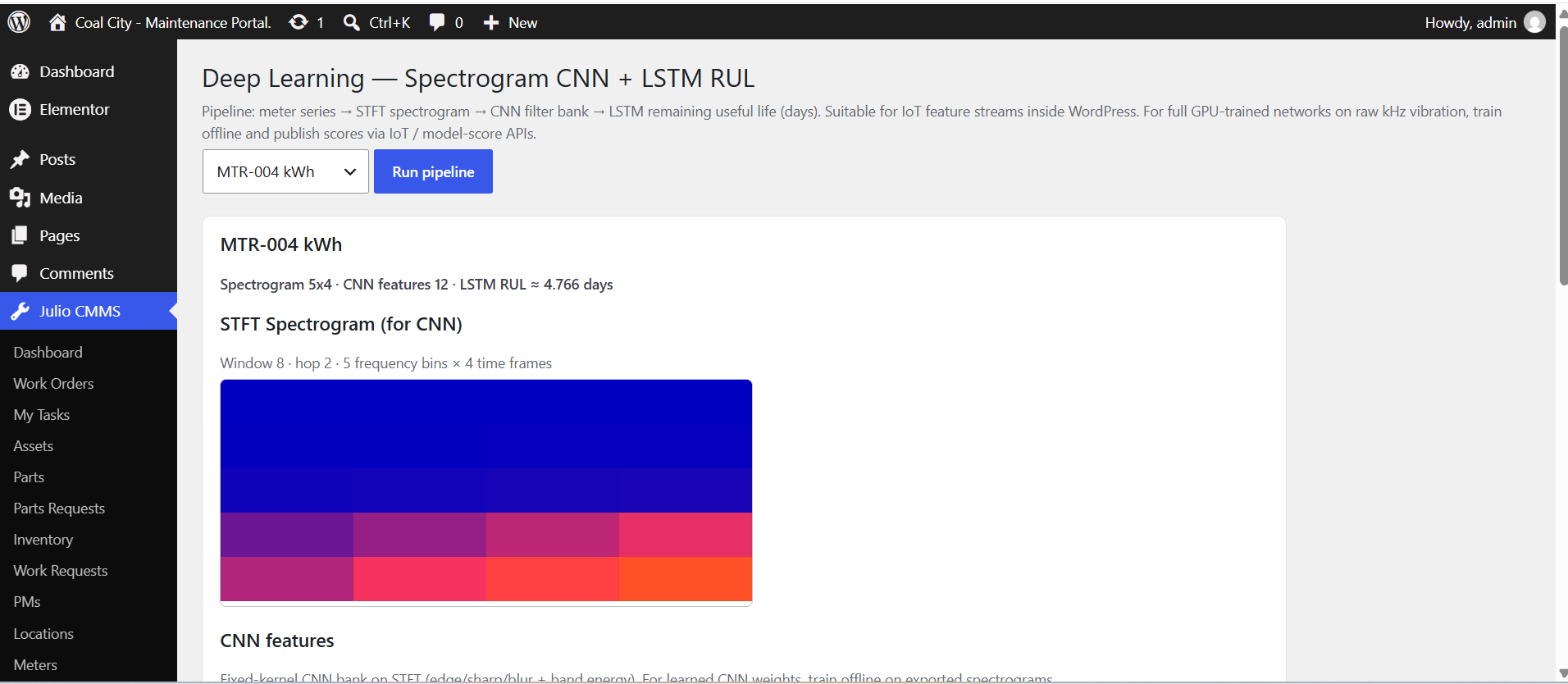
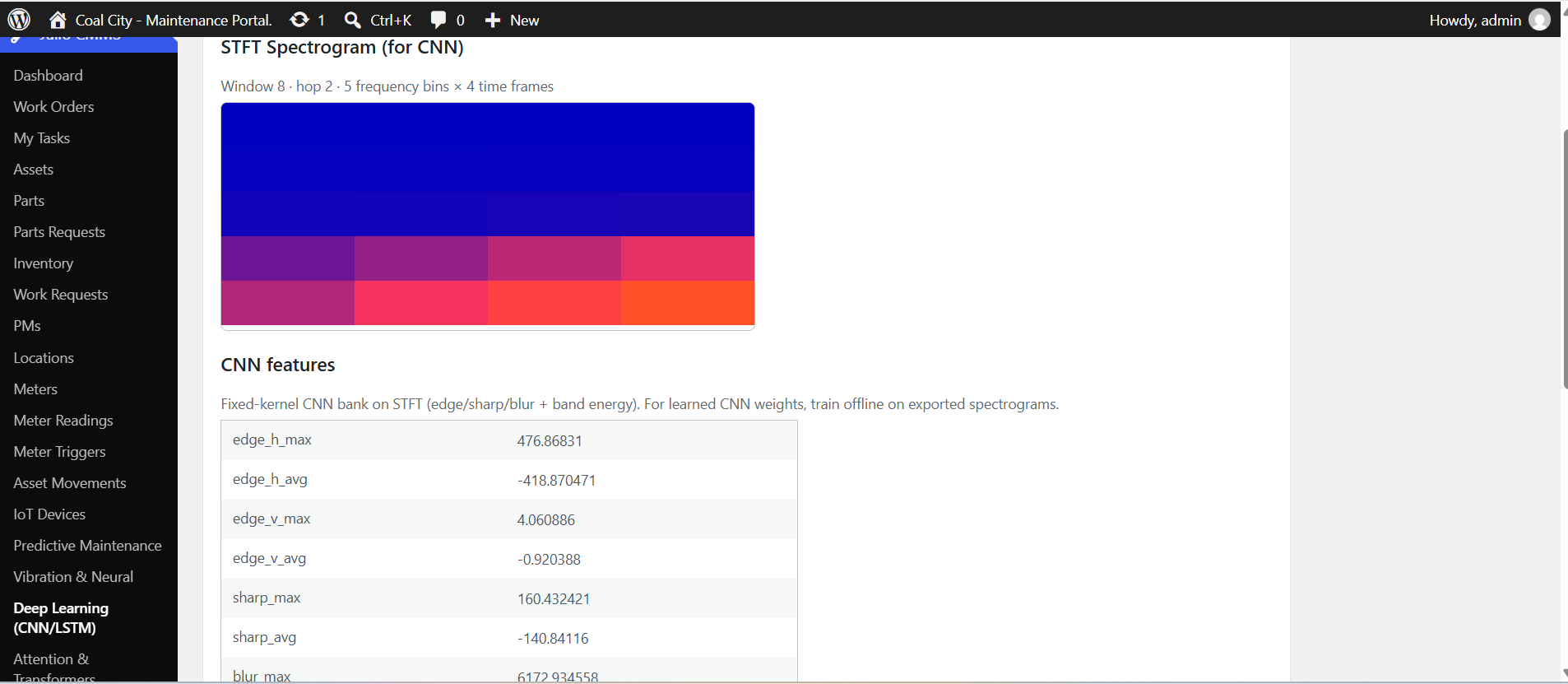
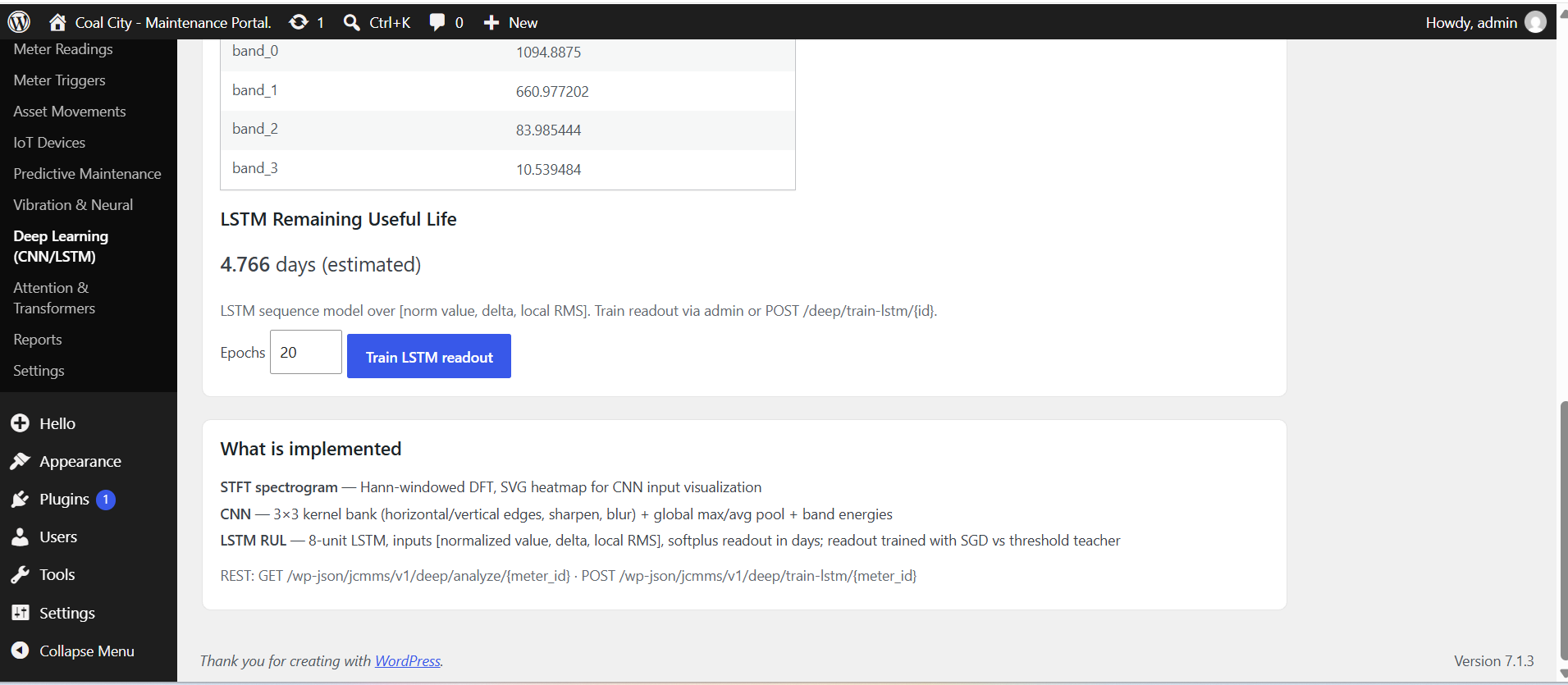
Deep Learning — STFT spectrogram CNN + LSTM RUL pipeline
CNN feature bank on spectrogram windows
LSTM remaining useful life readout and training controls
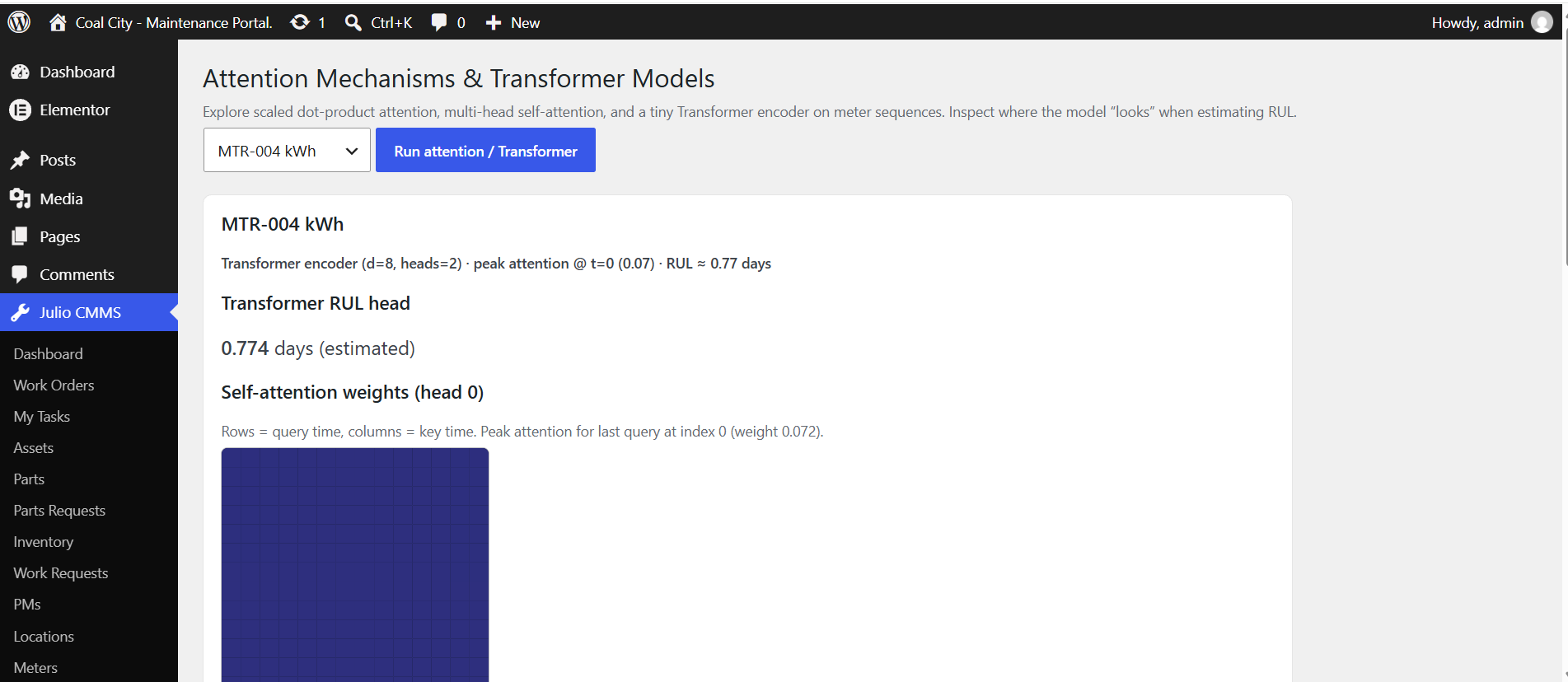
Attention & Transformer — self-attention RUL estimation
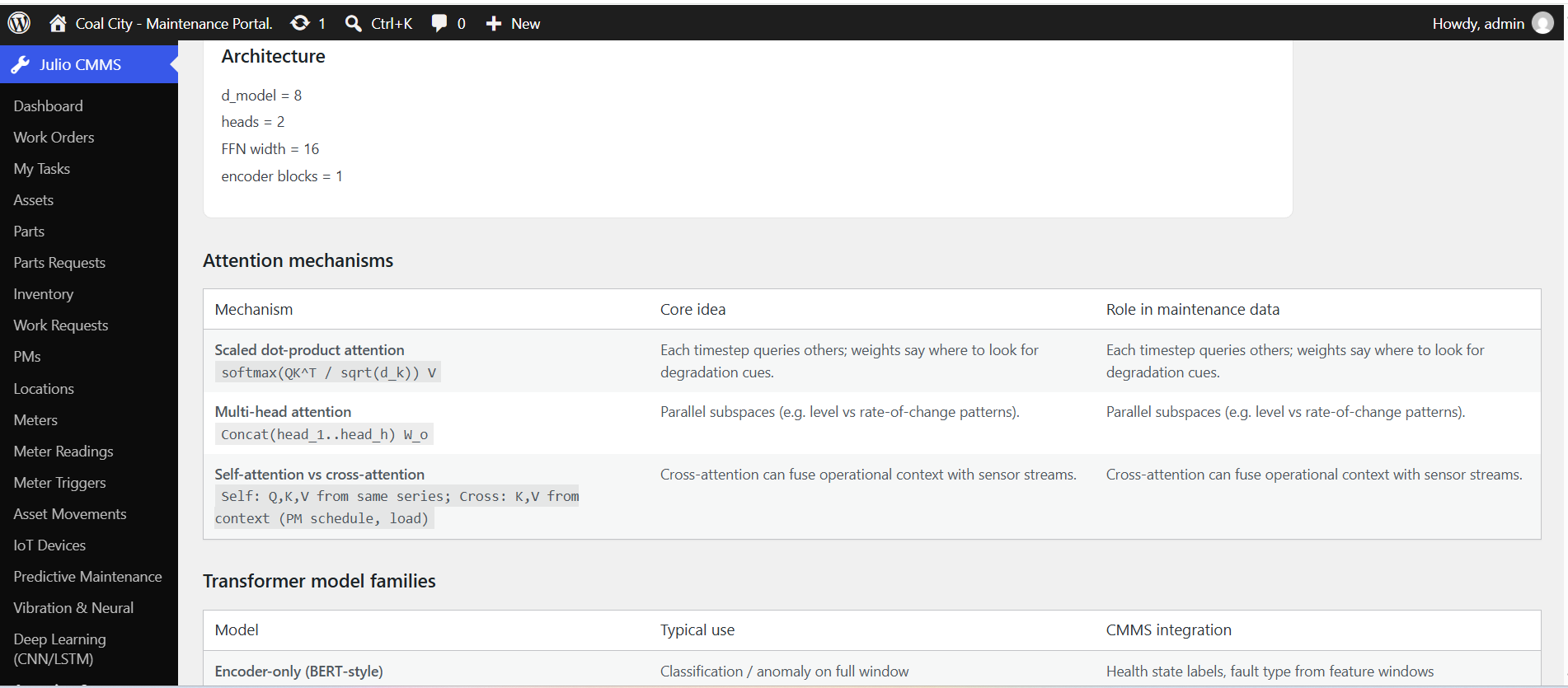
Attention mechanisms and architecture notes
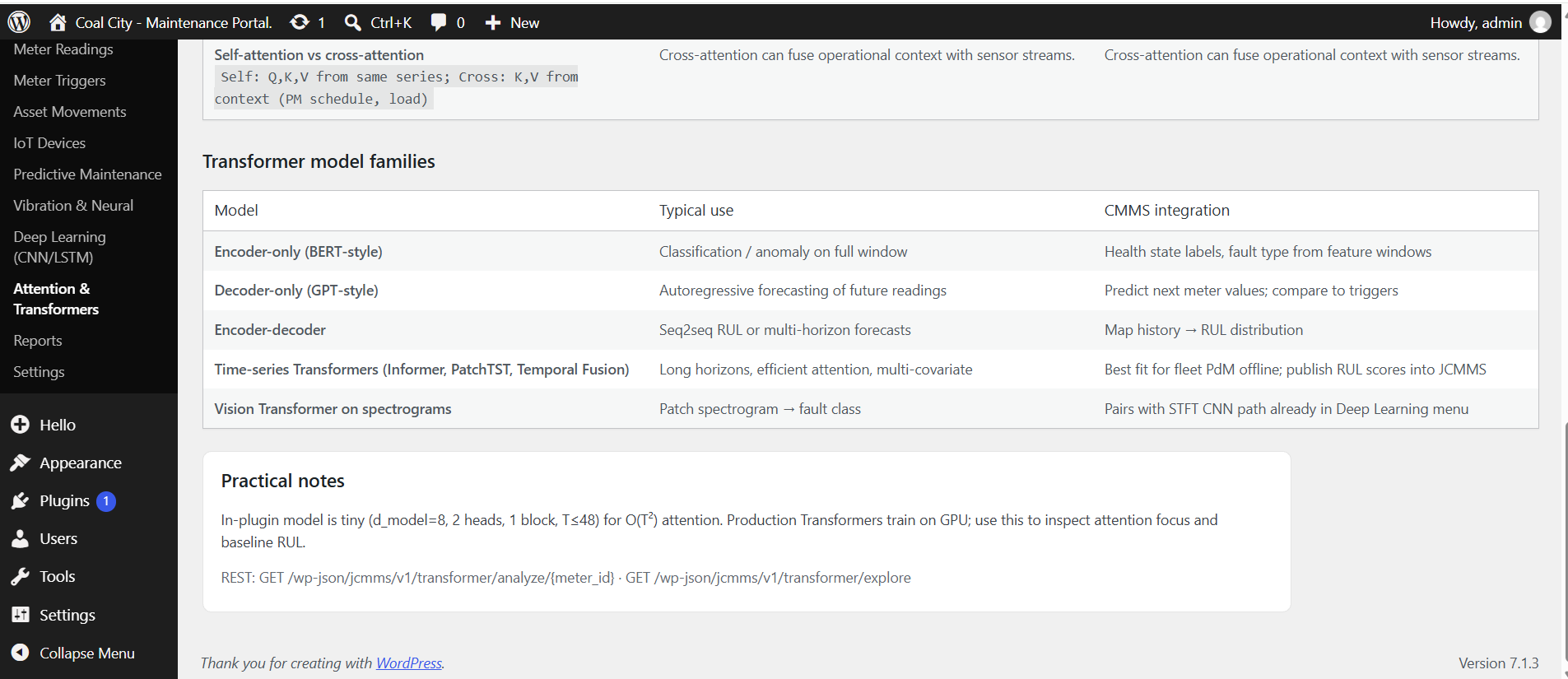
Transformer model families and practical CMMS integration
1 / 21

Why serious buyers choose JULIO CMMS WP

Not every plugin is a product. This one is engineered as a maintenance system that happens to install like a plugin.

Operational depth

  • End-to-end flow: request → order → parts → completion notes
  • Duplicate work orders and convert requests without retyping
  • PM and meter paths that create real work, not just reminders
  • Dashboard signals: backlog, busy users, compliance-oriented reports

IT & ownership advantages

  • Self-host on infrastructure you already budget for
  • No forced multi-tenant co-tenancy of your maintenance data
  • WordPress-native media for icons and work photo galleries
  • Clear upgrade path from Free (work orders) to full Lite suite

Built for distributed teams

  • Frontend portal for staff who should not live in wp-admin
  • Mobile API patterns for field technicians
  • Multi-language UI for mixed crews and regions
  • Role-aware tabs so storekeepers and techs see the right tools

Commercial clarity

  • Site-pack licensing with volume pricing — not opaque enterprise quotes only
  • Predictable cost as you roll out from pilot plant to multi-site
  • Marketing-ready story: CMMS benefits + CMS consolidation
  • Professional positioning against both spreadsheets and bloated SaaS

Competitor pricing strategies — and how JULIOCMMS differs

Most commercial CMMS products monetize with per-user monthly subscriptions. That model rewards seat growth and recurring renewals. JULIO CMMS WP uses one-time site packs so maintenance software cost does not scale with every technician login.

What cloud CMMS vendors typically do

  • Per-user / month pricing — public ranges often roughly $20–$75+ per user monthly (vendor and tier dependent).
  • Feature gates — core work orders on lower tiers; advanced PM, offline, analytics, or IoT on higher plans.
  • Free or limited trials — capped work orders or users to start adoption, then convert to paid seats.
  • Annual prepay discounts — lower effective monthly rate when billed yearly.
  • Implementation & add-ons — onboarding packages, premium support, extra modules.
  • Multi-year TCO — a 10-user team at ~$45/user/mo is on the order of ~$5,400/year before extras.

Illustrative public-market pattern (MaintainX, UpKeep, Limble, Fiix, eMaint-class pricing), not a quote from any single vendor.

JULIO CMMS WP pricing strategy

  • One-time license by site count — Pilot, Team Rollout, Operations Scale, Enterprise Fleet.
  • Volume by sites, not seats — per-site rate falls as pack size grows ($9,999 → $9,399).
  • Transparent list vs launch price — strikethrough list unit and pack totals; clear sale totals.
  • Own it for life — no mandatory per-user renewal meter for the software license model shown here.
  • Self-hosted WordPress — align cost with infrastructure you already run; keep maintenance data under your control.
  • TCO story — compare a pack total to 1–3 years of seat-based SaaS for the same operational footprint.

Example TCO framing (illustrative)

Scenario Cloud CMMS (indicative) JULIOCMMS pack
Single site, small crew ~$2,400–$6,000+/year (seats × 12) Pilot $9,999 one-time
5 operating sites Multiplies with users across sites Team Rollout $48,995 one-time
10 sites standardized Often five-figure annual software by year two Operations Scale $95,990 one-time
20-site fleet Seat growth + renewals dominate budget Enterprise Fleet $187,980 one-time

Hosting, optional implementation, and support services are separate from license packs. Competitor figures are market-order illustrations for buyer education.

Pricing

Simple site-pack licensing. Pay once per pack for the JULIO CMMS WP product license on the included number of sites. Select a column below to compare — volume reduces the per-site rate. One-time license. Own it for life!

Pilot

1 site
$11,099 list$9,999
per site
Total $11,099 $9,999
  • Full JULIO CMMS WP license
  • Ideal for proof of value
  • 1 production site
  • Standard documentation
Select Pilot
Most Popular

Team Rollout

5 sites
$10,799 list$9,799
per site
Total $53,995 $48,995
  • Everything in Pilot
  • $50+ volume savings vs higher tiers
  • Pilot + regional sites
  • Consistent process across plants
Select Team Rollout

Operations Scale

10 sites
$10,599 list$9,599
per site
Total $105,990 $95,990
  • Everything in Team Rollout
  • Strong volume pricing
  • Multi-region standard
  • Strong volume efficiency
Select Operations Scale

Enterprise Fleet

20 sites
$10,399 list$9,399
per site
Total $207,980 $187,980
  • Everything in Operations Scale
  • Best per-site rate
  • Best per-site rate
  • Wide portfolio coverage
Select Enterprise Fleet
Select a package to see totals.
Buy Now

Pricing shown is for software licensing of JULIO CMMS WP site packs. Hosting, custom development, and optional implementation services are separate. Need more than 20 sites? Contact sales for an extended fleet pack.

Technical article: Setting up JULIO CMMS WP on a company site

This guide walks an IT administrator or implementing partner through a production-minded setup of JULIO CMMS WP on a company WordPress site — from hosting prerequisites to first work orders, users, and mobile API access.

1. Prerequisites

  • WordPress 6.x on PHP 7.4+ (8.x recommended)
  • HTTPS enabled with a valid certificate
  • A role with install_plugins / activate_plugins capability
  • Object cache optional but recommended on busy sites
  • Backups enabled before install (files + database)

2. Install the plugin

  1. In wp-admin → Plugins → Add New → Upload Plugin, upload the JULIO CMMS WP ZIP.
  2. Activate JULIO CMMS WP. Activation creates the wp_jcmms_* tables.
  3. Confirm the admin menu appears (Dashboard, Work Orders, Assets, Parts, PMs, Locations, Meters, Reports, Settings, etc.).
If you also offer the free work-order-only edition, do not run Free and Lite active at the same time. Lite is the full product; Free is an entry module with assets listed in Settings.

3. Base configuration (Settings)

  1. Open JULIOCMMS → Settings.
  2. Define Asset Types (one per line) to match how your company classifies equipment.
  3. Configure email related options used for notifications where applicable.
  4. Review custom roles and which frontend tabs each role may see.
  5. Set language preferences; install optional language packs if you need locales beyond the core bundle.
  6. Note PM cron / scheduled generation status if you rely on automatic PM work orders.

4. Master data: locations, assets, parts

  1. Create the location hierarchy (site → area → room/line) before bulk assets.
  2. Add assets with type, parent, location, serial/model/make, and online status.
  3. Load parts with SKU/barcode, quantities, and minimums for store control.
  4. Optionally seed demo industry data only on non-production instances (separate seed plugin or API).

5. Users and responsibilities

  1. Create or reuse WordPress users for supervisors, technicians, and storekeepers.
  2. Assign WordPress roles / JULIOCMMS custom roles so permissions match job functions.
  3. Train technicians to use My Tasks and the frontend portal tabs relevant to them.
  4. Ensure at least one administrator monitors backlog and PM compliance reports weekly.

6. Operational workflows to enable on day one

  • Work request → work order conversion for intake discipline.
  • PM schedules on critical assets with clear next-due dates.
  • Meter definitions on assets where runtime or condition drives maintenance.
  • Parts request path so stores can supply or mark unavailable.

7. Frontend portal for the company site

Add the plugin’s frontend shortcodes/blocks to an authenticated page on your intranet theme (or a branded JULIOCMMS-oriented theme). Restrict the page to logged-in users. Verify tab visibility per role: work orders, my tasks, parts requests, and other modules you enable.

8. REST API and mobile access

Base namespace:

https://your-company-site.example/wp-json/jcmms/v1/

Typical first calls:

POST /wp-json/jcmms/v1/token
{ "username": "tech.user", "password": "********" }

GET /wp-json/jcmms/v1/ping
Authorization: Bearer <access_token>

GET /wp-json/jcmms/v1/my-tasks
GET /wp-json/jcmms/v1/work-orders
GET /wp-json/jcmms/v1/assets

Use token refresh endpoints for long-lived mobile sessions. Point the Android application’s base URL at your site root (for example https://your-company-site.example or the subdirectory where WordPress is installed). Enforce HTTPS only.

9. Go-live checklist

  • Backups verified and restore tested
  • SMTP or WordPress mail delivering notification messages
  • At least one completed work-order cycle on a non-critical asset
  • PM due list reviewed by maintenance lead
  • Mobile token issue/refresh tested against production URL
  • Language set for primary crew locale

10. Operating model after go-live

Treat the first 30 days as a process stabilization period: freeze asset naming conventions, require every reactive job to start as a request or order, and review PM compliance weekly. Expand meters and IoT ingest only after core work-order discipline is consistent.

Result: the company site becomes the system of record for maintenance execution — with the CMS benefits of WordPress and the operational depth of a purpose-built CMMS.

IoT sensor integration

Connect field sensors and gateways to JULIOCMMS meters. Readings flow into the same records that drive triggers, PdM analysis, and work orders — secured by a dedicated IoT API key (not a user password).

1. Register device

Map physical device_id to a JULIOCMMS meter in IoT Devices.

2. Authenticate

Send header X-JULIOCMMS-IoT-Key (site API key; rotatable in admin).

3. POST readings

Single JSON object or batch {"readings":[...]} to ingest.

4. Act

Meter updates; triggers and PdM endpoints use the new series.

Endpoint & auth

URL: POST /wp-json/jcmms/v1/iot/ingest

Auth: Header X-JULIOCMMS-IoT-Key: <api_key> (or api_key param). JWT alone is not enough — gateways use the IoT key.

Manage devices: GET/POST /wp-json/jcmms/v1/iot/devices (manager permission).

Payload shape

{ "device_id": "vib-crusher-01", "value": 3.8, "reading_at": "2026-09-29T16:00:00", "notes": "gateway-a" } /* or batch */ { "readings": [ { "device_id": "vib-crusher-01", "value": 3.8 }, { "meter_id": 12, "reading_value": 12500 } ] }

Resolve meter via device_id mapping or explicit meter_id. Accepts value or reading_value.

Device registry

Each IoT device stores device_id, linked meter_id, optional name, active flag, last_seen_at, and last_value for health checks.

Trigger bridge

Ingest calls the same reading pipeline as manual posts — equality, greater-than, less-than, and range triggers can open work or follow PM rules.

Analytics ready

Series feed PdM analyze (trend, RUL), vibration feature views, and deeper exploration modules without a second historian for basic condition workflows.

Edge computing benefits

IoT in maintenance works best when the edge (sensor, PLC gateway, or site PC) does the noisy, high-frequency work, and JULIOCMMS stores the decisions that matter for people and work orders.

Lower latency to act locally

Shut down a motor or raise a local alarm in milliseconds at the edge. Post the summary reading to WordPress when the network is free — the CMMS does not need every sample to protect the machine.

Less bandwidth & storage

Vibration waveforms can be megabytes per minute. Edge devices compute RMS, peak, or band energy and send sparse values to /iot/ingest. JULIOCMMS keeps an actionable series, not a second historian by default.

Resilience offline

Mine pits and plants often have intermittent links. Edge buffers samples, applies local interlocks, and retries ingest when the site VPN returns — work still gets created when readings land.

Cleaner trigger inputs

Debounce, unit conversion, and spike rejection belong at the edge so CMMS triggers (eq/gt/lt/range) see stable engineering values — fewer false work orders.

Privacy & segmentation

Raw process data can stay on-prem at the edge. Only maintenance-relevant KPIs cross into the WordPress CMMS security boundary.

Scalable multi-site

Each site gateway maps its own device_ids to meters. Central JULIOCMMS still sees triggers and PdM; edge absorbs sensor fan-out.

Edge buffering strategies

When connectivity is imperfect or sensors are noisy, the gateway should buffer and shape data before calling JULIOCMMS ingest — so triggers see stable engineering values, not raw chatter.

Core patterns

  • Queue + retry — FIFO with exponential backoff on HTTP 5xx / network loss.
  • Time-window aggregate — min / max / avg / last over a window (e.g. 1 minute).
  • Change-of-value (CoV) — send only when Δ exceeds a threshold, plus a heartbeat.
  • Threshold pre-filter — local hysteresis so spikes do not enqueue false events.
  • Priority lanes — critical crossings first; routine KPIs when the link is free.
  • Store-and-forward — disk/SQLite when RAM queues fill; drain after reboot.
  • Batch POST — {"readings":[...]} to match native JULIOCMMS batch ingest.

Design rules that protect work quality

  • Apply hysteresis on local alarms (e.g. fire > 80, clear < 75).
  • Always send a heartbeat so device last_seen stays trustworthy.
  • Preserve edge timestamps in reading_at.
  • Never block the PLC scan loop on a slow WordPress response — buffer and back off.
  • Cap retention; drop oldest routine samples before critical event markers.
  • Prefer aggregates over full waveforms for CMMS; keep raw traces local for deep diagnosis.

MQTT vs HTTP ingest

JULIOCMMS accepts readings over HTTPS (POST /wp-json/jcmms/v1/iot/ingest with X-JULIOCMMS-IoT-Key). MQTT remains an excellent plant-side bus — typically bridged into HTTP at the edge.

HTTP → JULIOCMMS (native)

  • Matches WordPress TLS, proxies, WAF, and API-key ops
  • Simple for gateways, scripts, and cloud functions
  • Natural batching of many readings per request
  • Clear status codes and server logs for support
  • Best for maintenance KPIs (seconds–minutes), not hard real-time control

Trade-off: the edge must push on a schedule; PHP is not a long-lived broker subscriber.

MQTT (plant / OT)

  • Lightweight pub/sub already common on sensors and gateways
  • QoS, retained messages, and last-will for presence
  • Fan-out to SCADA, historian, and a CMMS bridge
  • Strong inside the facility network at higher message rates
  • Needs a broker plus topic → device_id conventions

Trade-off: WordPress is a poor always-on MQTT client — use a bridge, do not subscribe inside the plugin process.

Recommended split

  • Inside the fence: MQTT (or OPC UA / Modbus) for device traffic and local subscribers.
  • Into the CMMS: HTTPS ingest with API key, batched, timestamped, sparse KPIs.
  • Protection stays at the edge; assignment, history, and compliance stay in JULIOCMMS.

MQTT quality of service (QoS)

MQTT QoS applies to client ↔ broker hops on the plant network. It does not by itself guarantee “exactly once into WordPress.” Pair plant-side QoS with edge buffering and HTTPS retries into JULIOCMMS.

0

QoS 0 — At most once

Fire-and-forget. Lowest overhead; messages may be lost. Use for high-frequency telemetry where the next sample replaces the last (e.g. dense vibration streams kept local).

1

QoS 1 — At least once

Delivery until acknowledged; duplicates possible. Default for alerts, status changes, and important aggregates. Make downstream handling idempotent.

2

QoS 2 — Exactly once

Four-step handshake; highest latency. Reserve for rare events where duplicates cause real harm (billing, legal custody). Rarely needed for routine CMMS KPIs.

Practical mapping for maintenance data

  • QoS 0 — High-rate samples on a stable plant LAN; aggregate before leaving the edge.
  • QoS 1 — Threshold crossings, equipment state, batched KPI publishes (most common choice).
  • QoS 2 — Sparingly; prefer application idempotency over protocol cost for work-order triggers.
  • Northbound to JULIOCMMS — Always HTTPS POST /iot/ingest with API key, batching, and retry/backoff (HTTP is your CMMS “QoS”).

Edge gateway hardware options

Choose hardware by field protocols, buffering capacity, outbound path (Ethernet/LTE), and environment— then run a thin bridge that maps tags to device_id and posts JSON to JULIOCMMS.

By role

  • Protocol converters — Modbus/BACnet/serial → MQTT/HTTP; DIN-rail, 24 V, vendor mapping UI (e.g. Red Lion Data Station, industrial Modbus→MQTT units).
  • Edge computers — Node-RED/Docker, local Mosquitto, custom HTTPS bridge (Revolution Pi, Robustel EG-class, OnLogic Factor/CL/Helix).
  • I/O gateways — On-board DI/DO/AI plus MQTT for small skids (e.g. Opto 22 groov RIO-class).
  • Cellular rugged gateways — Dual-SIM LTE/5G for remote pumps, mines, and unmanned sites with store-and-forward.

Must-haves for JULIOCMMS

  • Outbound HTTPS (or MQTT to a bridge that performs HTTPS ingest)
  • Store-and-forward when the WAN drops
  • Field protocols you actually run (Modbus RTU/TCP, OPC UA, BACnet, …)
  • JSON mapping to device_id, value, reading_at
  • Industrial power/temperature and NTP/time sync
  • TLS and unique credentials per site — no shared defaults

Small cabinet

DIN-rail Modbus→MQTT/HTTP converter, mapping UI, batch POST every minute + on threshold. Minimal software ownership.

Plant standard

Linux edge PC with Node-RED or containers, local broker, hysteresis, disk queue, HTTPS to each site’s WordPress CMMS.

Remote asset

Cellular industrial gateway, aggressive CoV + heartbeat, multi-hour buffer, critical events prioritized when the link returns.

Buy JULIO CMMS WP — own it for life

One-time site-pack licensing. No per-user subscription tax. After you click Buy Now, complete checkout or request an invoice for your selected pack.

Selected pack totals appear in Pricing above.

Email sales to purchase Back to packs

FAQ

Straight answers for maintenance leaders and IT buyers.

Is this a full CMMS or only a work-order list?

Full CMMS scope: assets, locations, PMs, parts, requests, meters/triggers, reports, portal, and API — centered on work execution.

Can we stay self-hosted for data control?

Yes. JULIO CMMS WP runs on your WordPress infrastructure. You control hosting, backups, and access policies.

Does it support mobile technicians?

Yes. A JWT-secured REST API supports mobile clients; list/detail CRUD resources align with field workflows such as My Tasks and work orders.

How does licensing work across environments?

License packs are sold by number of sites (1 / 5 / 10 / 20) with declining per-site rates. Use Pilot for a single production site; use larger packs for multi-site rollouts.

Can we start smaller?

A Free edition focused on work orders (with assets defined in Settings) can introduce the workflow; upgrade to Lite when you need the full module set.

What about multiple languages?

The product ships with extensive internationalization support and optional language packs for broader locale coverage.

Put maintenance on the platform your company already owns

Stop paying the hidden tax of disconnected tools. Deploy JULIO CMMS WP, standardize work execution, and give every site a CMMS that integrates with your CMS — not another silo.

Select your site pack